
Why European Banking Integration Becomes a Salesforce Challenge
Have you ever opened a Salesforce Account and seen almost everything about the customer, but still could not answer one simple finance question: has the invoice been paid?
I have seen this situation many times in different forms. Sales has the Account, Opportunity, product details, Quote, and maybe even the Invoice record. Finance has the payment status somewhere else. From the Salesforce side, the customer process looks complete. From the finance side, the most important part is still missing: the money.
Creating an invoice from Salesforce data is useful, but it does not automatically tell the team what happened after the invoice was sent:
- Did the customer pay by bank transfer?
- Was the payment collected by direct debit?
- Was the payment matched to the right invoice?
- Is the invoice partly paid, overdue, or ready for a reminder?
In Europe, this challenge has a specific banking and payment context. The most recent data from the European Central Bank for the first half of 2025 shows the scale of payment activity in Europe. In the euro area alone, there were 77.7 billion non-cash payment transactions, with a total value of €116.0 trillion. Credit transfers accounted for €107.3 trillion, or 92% of the total value of non-cash payments.
For companies billing from Salesforce, this is a strong reason to connect invoice records with bank payment data. Payment visibility is part of the finance process, not a separate afterthought. For a Salesforce team, the issue is operational:
- Sales wants to know whether the customer can move forward.
- Finance wants to know what is open, paid, or overdue.
- Management wants a clear picture of revenue after the deal is won.
If payment data stays outside Salesforce, all these people may look at the same customer and still have different answers.
Salesforce Online Banking and the EU Payment Flow
When people talk about payments in Salesforce, it can sound like one task. European finance teams usually deal with several connected parts of the payment flow around the invoice.
A customer may pay through a SEPA transfer, a direct debit, or another bank payment route. In cross-border payment scenarios, SWIFT can appear in the bank details that finance teams store or review, especially when the payment does not fit a simple SEPA flow. And when finance needs bank transactions to come back into Salesforce, Open Banking becomes part of the discussion because it can support access to account and transaction data through an approved banking connection layer. From the Salesforce side, these banking topics usually become practical in four places:
- Payment method. Customers can pay invoices in different ways, including cards, bank transfers, direct debits, and other digital payment methods. For Salesforce users, one small detail is very important here: the payment reference. If the invoice number or customer reference is included correctly, the payment is much easier to connect with the right invoice. If not, finance may still need to check the bank transaction manually.
- Payment collection. Sometimes the company does not wait for the customer to send a transfer. With SEPA Direct Debit, the company can collect money from the customer’s bank account after the customer has given permission.
- Bank transaction visibility. An invoice does not become paid because it was created or sent. Finance needs to see what happened in the bank account. If bank transactions can be connected with invoice records, finance users can work with payment status closer to the customer and invoice data.
- Transaction matching and follow-up. Bank integration is useful only if imported transactions can be connected to the right finance records. For example, finance may need to match bank transactions with incoming or outgoing invoices, credit notes, or Self-Billing Invoices. After that, the matched status can support the next action, such as updating payment status or starting an invoice reminder.
Insight: According to the European Central Bank report, euro area direct debits reached 11.3 billion transactions in the first half of 2025, with a total value of €5.6 trillion. For Salesforce users, this means that mandate data, collection status, failed payments, and invoice matching may become part of daily finance work.
Why Salesforce Banking Integration Often Requires More Than One Tool
After invoice creation, Salesforce teams often discover that banking is not one feature. It includes bank transaction sync, payment matching, SEPA collection, payment status updates, and reminders.
A common starting point is a billing app. The team can create invoices, credit notes, and reminders in Salesforce, but then the next questions appear. Where do bank transactions come from? How are payments matched to invoices? Can finance collect direct debits?
If the billing app does not cover these areas, the team usually needs another connector, banking app, payment app, or custom integration.
| Salesforce Banking Integration Options Compared | |||
| Integration option | When it fits | What it usually solves | Gap to check |
| 1. Banking connector | Invoices are already handled, but bank data is outside Salesforce | Bank account access and transaction sync | It may not cover SEPA collection, payment matching, or reminders |
| 2. Separate banking or payment app | The billing app exists, but payment handling is missing | Bank transactions, reconciliation, direct debit handling, online payments | Several apps need correct mapping and permissions |
| 3. Custom banking integration | The company has specific bank, payment provider, or internal system needs | More control over data flow and business rules | Building, testing, monitoring, and long-term maintenance stay with the team |
| 4. Billing app with banking features | The team wants invoice and payment work closer to the same Salesforce process | Invoices, bank transactions, payment status, and sometimes SEPA handling | Coverage, add-ons, and user access still need to be checked |
So the choice is not only which app to install. The bigger question is how many moving parts the team is ready to manage.
Looking for a Combined Salesforce Lead to Cash and Banking Setup on AppExchange
At this point, I would probably do what many Salesforce users do first: open Salesforce AppExchange (now AgentExchange) and search for apps that can help with billing and banking integration. The search quickly shows that there are different types of solutions. Some focus on invoice management, some on banking connection, some on payments, and some combine several finance tasks in one app.
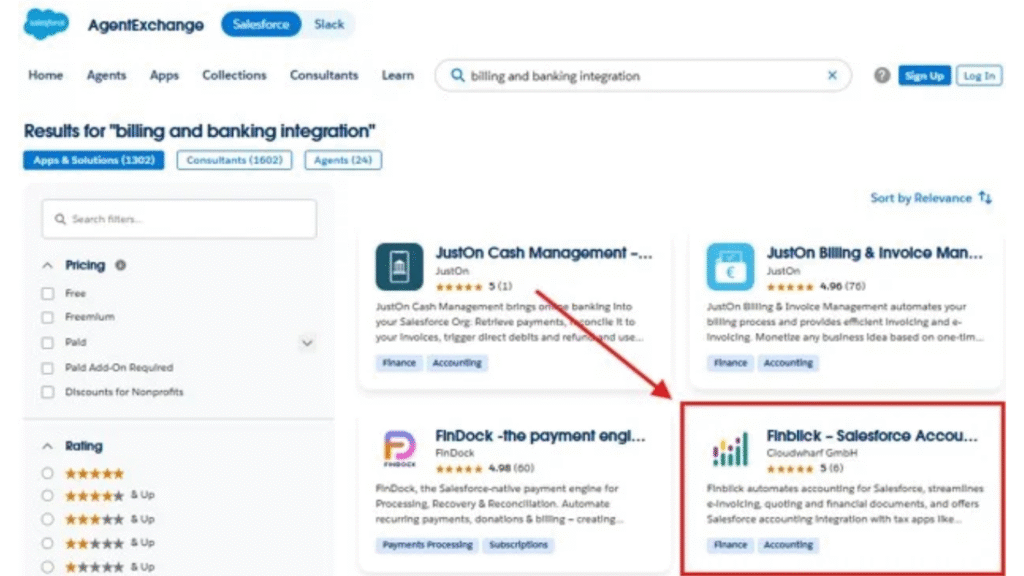
Billing and banking integration solutions on AppExchange
Among the solutions that appear in this search, Finblick by Cloudwharf GmbH is one of the first options to look at. It is listed as a Salesforce app for quotes and e-invoice management, which already makes it relevant to this topic. But the real question is whether the app connects the pieces we discussed above: invoices, bank visibility, payment collection, payment matching, and reminders.
So let’s look at this solution from that practical angle.
Finblick on AppExchange
Finblick is worth looking at here because it does not start only from a bank connection. It starts from the finance document and keeps payment-related work close to it.
- Finance documents as the starting point. The app covers quotes, orders, invoices, credit notes, and e-invoices. This matters because the payment question usually starts from a document.
- Bank visibility around the invoice. With bank integration, the goal is to connect bank transaction data with invoice records already stored in Salesforce.
- SEPA collection in the same context. The same logic applies to SEPA Direct Debit. If the company collects payments from customer bank accounts, the mandate, invoice amount, collection status, and payment result should not feel disconnected from the invoice.
- Transaction matching and payment follow-up. Transactions can be matched with incoming and outgoing invoices, credit notes, and Self-Billing Invoices, while reminders can follow from the matched payment status.
For a Salesforce lead to cash process, this means finance work can stay closer to the same customer record as the process moves from document creation to payment follow-up.
Insight: SEPA is large enough to treat as a core payment layer. The European Payments Council says its payment schemes are used by close to 4,000 payment service providers in Europe and help process over 50 billion euro transactions in SEPA each year, including more than 29 billion credit transfers and over 21 billion direct debits.
Step-by-Step: Setting Up Salesforce European Banking Integration
A practical Finblick app review should also look at setup, not only features. In a lead to cash Salesforce setup, I would not start with banking first. Bank visibility becomes useful only when invoices and payment records already exist in Salesforce.
Step 1. Prepare the Org, Install the App, and Connect the App
Before installing Finblick, the Salesforce org needs several standard features enabled: State and Country or Territory Picklists, Quotes, Orders, and Custom Address Fields.
After that, the package can be installed from AppExchange. After installation, the admin opens the Finblick app, goes to the Finblick Setup tab, and connects the org to the Finblick server.
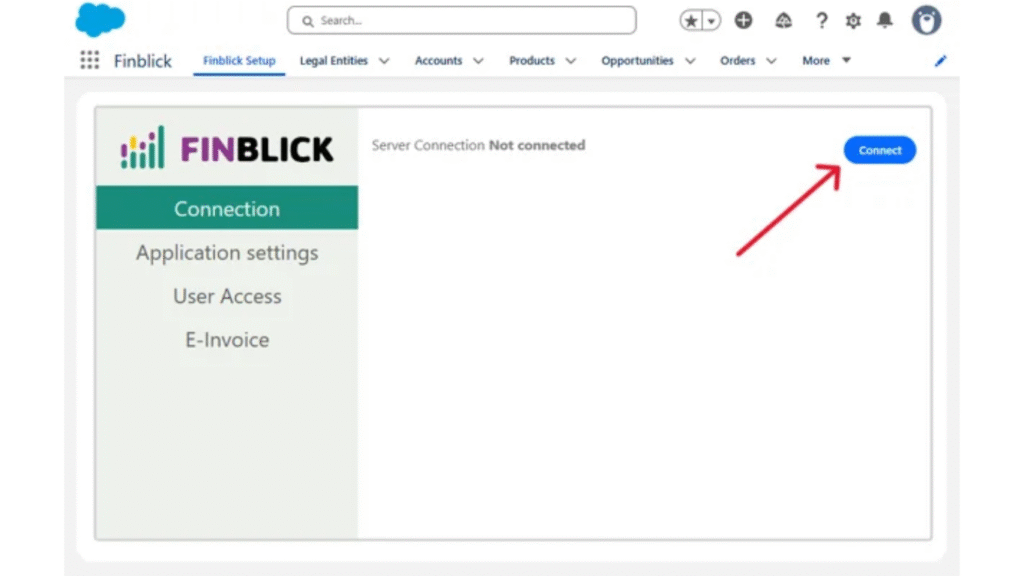
Connection to the server in Finblick
Step 2. Assign Access and Review Finance Settings
Finblick separates access by user type. Read-only users can view data, Sales users can work mainly with quotes, and Finance users can work with quotes, orders, invoices, credit notes, and related finance records.
This setup is managed from Finblick Setup under User Access. The admin selects users, chooses the license type, keeps Auto-assign permissions selected, and clicks Update. Extra permission sets control Admin access and banking features.
The admin should also review application settings and company-related data, including multiple legal entities, quote approval, customer and supplier number generation, and negative quantities. The Legal Entity record controls company information that appears on financial documents, such as company name, address, VAT ID, branding, templates, number sequences, and related document settings.
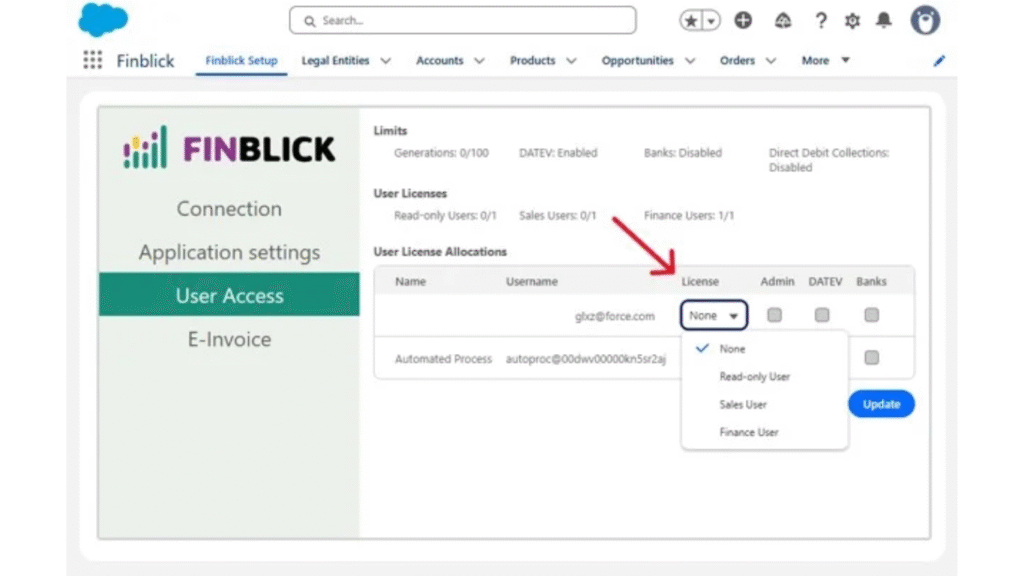
User Licence Allocations in the application
Step 3. Prepare Salesforce Pages and Test the First Document Flow
Before working with bank data, users need clear Salesforce pages for quotes, orders, invoices, and credit notes. In practice, this means adding the needed related lists, fields, tabs, actions, and Finblick components.
After the pages are ready, the team can test the first document flow.
E-invoice formats on the Finblick invoice screen
Step 4. Add Bank Transaction Sync and Automated Payment Reconciliation
After the first invoices are in Salesforce, bank data becomes easier to use in a practical way. Finblick supports bank integration via FinAPI, which gives access to broad European bank coverage through an Open Banking connection layer. For this part, the Finblick Banks User permission set and payment account access need to be in place.
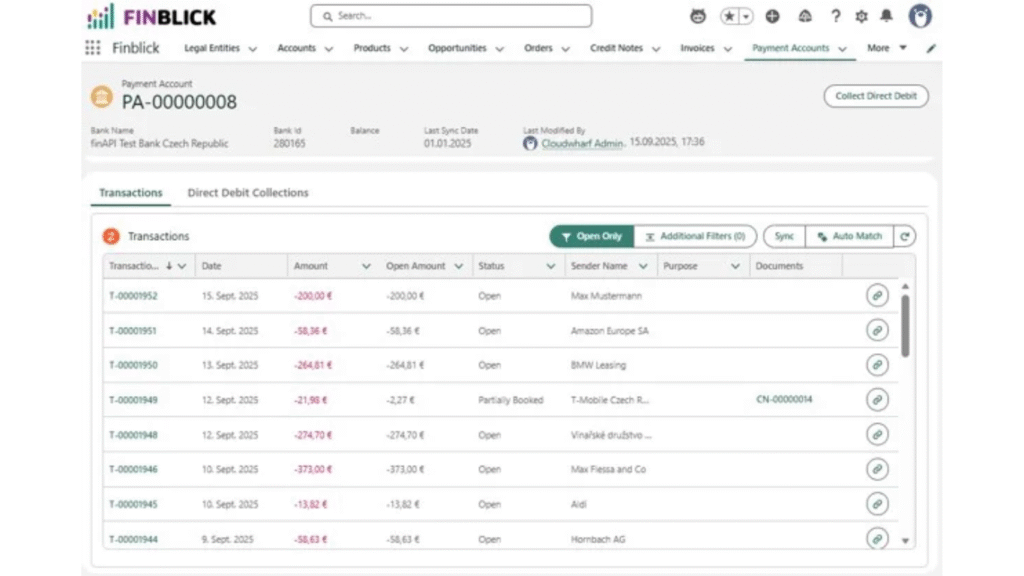
Payment account transactions in Finblick
Once bank transactions are available, Finblick can support automated payment reconciliation by connecting bank transactions with invoices and credit notes.
Matching a bank transaction to a finance document in Finblick
Step 5. Set Up SEPA Direct Debit Automation Where Payment Collection Is Needed
If the company collects payments from customer bank accounts, SEPA Direct Debit automation can support that part of the process. In Finblick, open invoices can be collected automatically when a valid SEPA mandate is available from the customer.
Direct debits are started from Salesforce through the Finblick SEPA module.
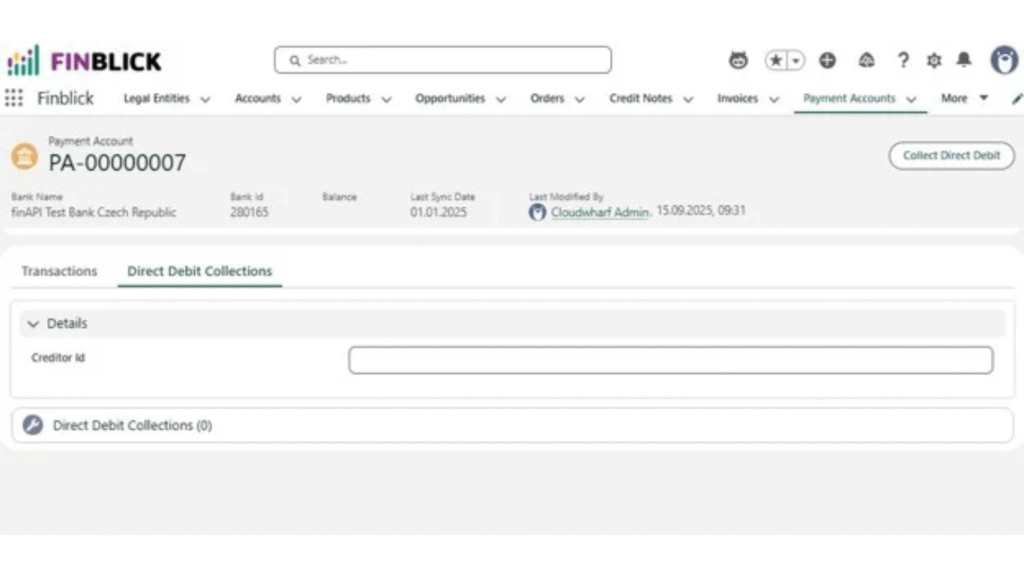
Direct Debit Collections tab on the Finblick payment account screen
Step 6. Follow up with Payment Reminders
Invoice payment reminders help the team follow up on open invoices from the same Salesforce-based process, instead of checking payment status in one place and writing reminders somewhere else.
Final Thought: Keep Banking Close to the Salesforce Record
For a simple invoice PDF, a lighter document tool may be enough. But if the team wants invoices, bank transactions, SEPA collection, and payment reminders closer to Salesforce records, the setup needs more thought.
Otherwise, the process can become a group of tools that all need to pass data between each other. Finblick is worth reviewing in that context. It is not the only possible answer, and some teams may still prefer a separate banking app or custom integration.
The best choice depends on how much of the payment process should stay in Salesforce. If the goal is fewer manual checks and a clearer connection between billing and payment status, keeping banking closer to the customer and invoice record is a practical direction to consider.
For similar news on banking, please read:
1) Regions Financial Acquires Frazer Lanier to Expand Investment Banking
2) Republic Bank Extends Online Banking to Clients Without SSNs or TINs